|
OSC Receive Parameters
|
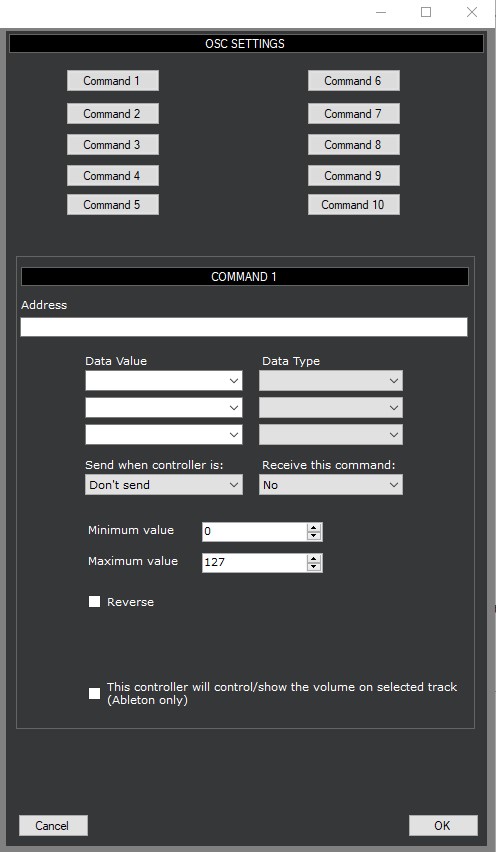
|
Instructions
|
OSC Receive Parameters
|
|
| Operation | Command Format | Example | Notes | |
|---|---|---|---|---|
| Fader | ||||
| to receive value updates | /address integer or /address float | /fader 45 | Use the Data Value 'CC Value' in DAWSound. | |
| to receive caption updates | /address string | /fader "Vocals" | ||
| Button | ||||
| to receive caption updates | /address string | /button "C3" | ||
| to receive color updates | /address color | /button 8388352 | The color received will be the 'OFF' color. DAWSound will automatically calculate the 'ON' color. | |
| to turn the Button on | /address integer | /button 70 | Any value of 65 or greater will turn the Button on. | |
| to turn the Button off | /address integer | /button 0 | A value of 64 or less will turn the Button off. | |
| MIDI Modifier | ||||
| to receive caption updates | /address string | /midimod "C3" | ||
| to receive color updates | /address color | /midimod 8388352 | The color received will be the 'OFF' color. DAWSound will automatically calculate the 'ON' color. | |
| to turn the MIDIMod on | /address integer | /midimod 70 | Any value of 65 or greater will turn the MIDIMod on. | |
| to turn the MIDIMod off | /address integer | /midimod 0 | A value of 64 or less will turn the MIDIMod off. | |
| Popup Layout | ||||
| to receive caption updates | /address string | /playout "Mixer" | ||
| to receive color updates | /address color | /playout 8388352 | The color received will be the 'OFF' color. DAWSound will automatically calculate the 'ON' color. | |
| to turn the Popup Layout on | /address integer | /playout 70 | Any value of 65 or greater will turn the Popup Layout on. | |
| to turn the Popup Layout off | /address integer | /playout 0 | A value of 64 or less will turn the Popup Layout off. | |
| Encoder | ||||
| to receive caption updates | /address string | /encoder "Filter" | ||
| to receive value updates | /address integer or /address float | /encoder 45 | Use the Data Value 'CC Value' in DAWSound. | |
| Knob | ||||
| to receive caption updates | /address string | /knob "Filter" | ||
| to receive value updates | /address integer or /address float | /knob 45 | Use the Data Value 'CC Value' in DAWSound. | |
| Matrix Button | ||||
| to turn the Matrix Button on | /address integer | /matrixbutton 70 | Any value of 65 or greater will turn the Matrix Button on. | |
| to turn the Matrix Button off | /address integer | /matrixbutton 0 | A value of 64 or less will turn the Matrix Button off. | |
| VU Meter | ||||
| to receive value updates | /address integer or /address float | /vu .45 | Use the Data Value 'CC Value' in DAWSound. DAWSound expects values between 0 and 1. | |
| to receive caption updates | /address string | /vu "Vocals" | ||
| Label / LED | ||||
| to receive caption updates | /address string | /label "Comp" | ||
| to turn the LED on | /address integer | /led 70 | Any value of 65 or greater will turn the LED on. | |
| to turn the LED off | /address integer | /led 0 | A value of 64 or less will turn the LED off. | |
| XY Pad | ||||
| to receive caption updates | /address string | /xypad "Panner" | ||
| to receive value updates for the X value | /address integer or /address float | /xypad 45 | Use the DAWSound OSC Command 1 for values for the X axis. Use the Data Value 'CC Value' in DAWSound. | |
| to receive value updates for the Y value | /address integer or /address float | /xypad 15 | Use the DAWSound OSC Command 2 for values for the Y axis. Use the Data Value 'CC Value' in DAWSound. | |